



Construction Workflow Software
Go from pre- to post-construction faster
Automated workflows mean smoother transitions from job start to completion. Update schedules, gather bids and stay on budget – all from the palm of your hand.

How Buildertrend speeds up construction workflows
Our construction project management software increases productivity by centralizing project information and automating tedious workflows. With real-time progress updates, document sharing and task management tools, Buildertrend improves communication and collaboration, minimizing delays and enhancing overall project efficiency.
In the platform, construction pros can monitor timelines, manage resources and promptly address any issues that arise. Buildertrend’s comprehensive platform empowers builders to save time, reduce manual errors and deliver projects on budget and on time.
| Buildertrend feature | What it does |
|---|---|
| Pre-construction | Control costs and prevent delays with project planning tools like Buildertrend Takeoff, Estimates and the Schedule. |
| Bidding | Win more jobs with the ability to send, collect and manage all subcontractor bids in one place. |
| Budgeting | Avoid surprises and track costs in real time with the Budget feature. |
| Mobilization | Once the contract is signed, kick off the project with automated notifications for subs and crew members. |
| Project management | Use the Schedule, Daily Logs, Tasks and Change Orders to control each job from start to finish. |
| Testing and commissioning | Verify and document the quality and safety of various aspects of a project, and keep all files in one centralized location for easy access. |
| Completion and handover | Check off the final punch list item with Tasks and receive your final payment when clients pay online. |
| Post-construction | Manage warranty claims and schedule maintenance appointments all through one platform. |

Buildertrend’s workflow software increases productivity and efficiency
50%
More productive with the Schedule
1/2
The time spent building accurate Proposals
90%
Fewer calls and emails with Daily Logs
Discover Buildertrend’s construction workflow in just a few minutes

The benefits of Buildertrend’s construction workflow software
Buildertrend helps builders and remodelers work simpler by automating tedious workflows. Streamline project planning, create more efficient job sites and gain better financial control with our tech on your side.
Communication
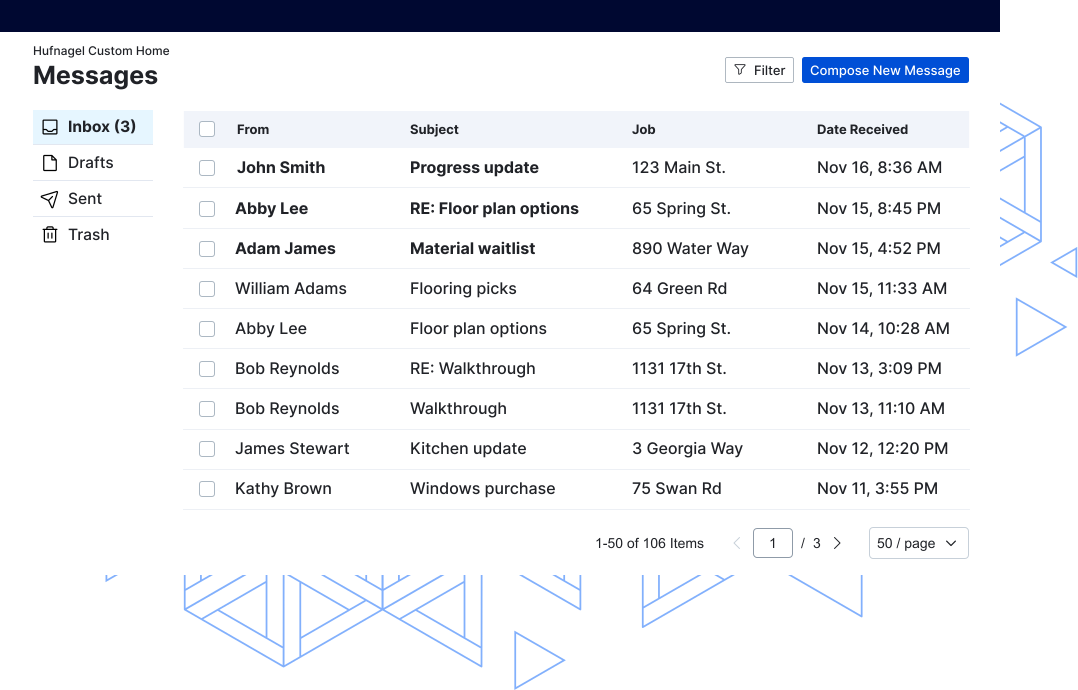
Communication tools enhance construction workflows by fostering better collaboration and information exchange among project stakeholders. In the ever-changing scope of construction projects, where crew members and subs are dispersed across different job sites and offices, effective communication is crucial.
Buildertrend facilitates real-time sharing of project updates, scope changes and critical information. Transparent communication ensures all team members – from project managers to onsite workers – are on the same page, minimizing misunderstandings and delays. Our tech helps create a cohesive and well-informed construction team.
Document control
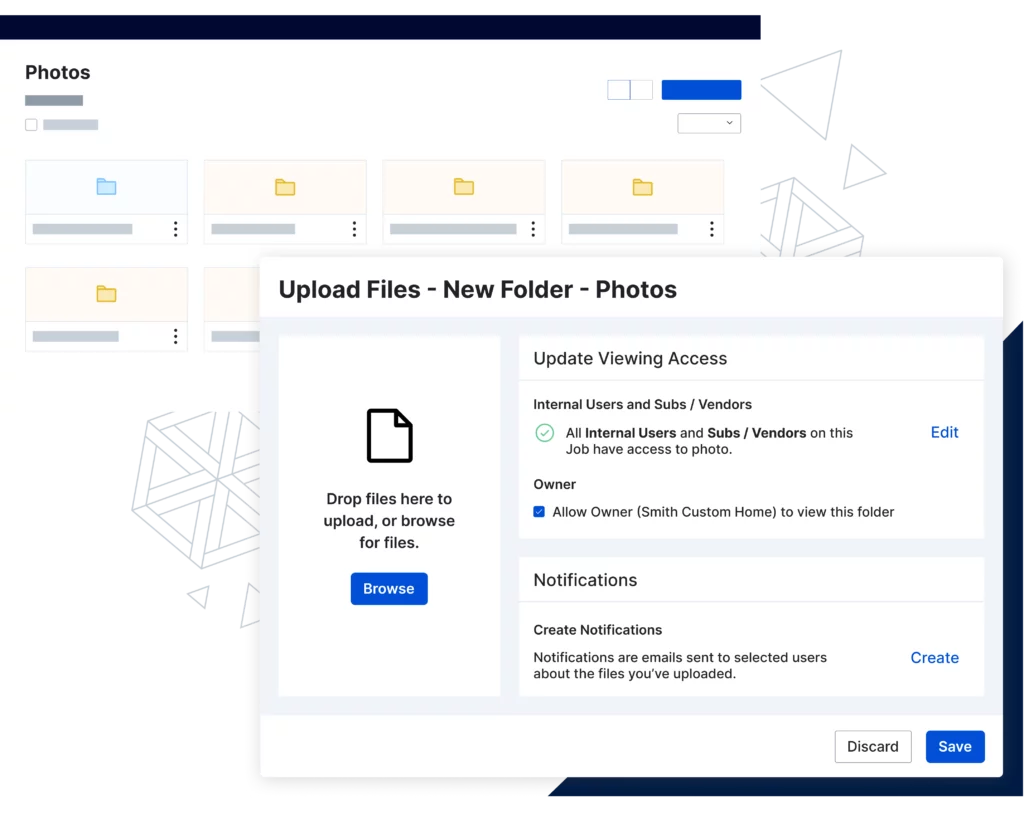
Being able to manage important files is necessary in ensuring a successful project and business. By providing a centralized and organized platform for managing photos, videos, contracts, blueprints and other critical documents, Buildertrend ensures everyone is working from a single source of truth.
Our platform also accounts for version control and accessibility in order to reduce errors and ensure team members are viewing the most up-to-date documents. With Buildertrend, your team is better equipped to make decisions, collaborate and contribute to a more effective workflow.
Change Order management
Buildertrend’s Change Orders feature improves construction workflows by providing an efficient way of managing changes to project plans. This tool allows builders to initiate, review and approve changes with ease.
By documenting adjustments promptly and tracking associated costs, Buildertrend ensures transparency and accountability throughout the change order process. This approach minimizes misunderstandings, reduces delays and allows for better budget control – ultimately contributing to smoother construction workflows and improved project outcomes.

Buildertrend – manage your workflow your way
Our team can show you how to fit Buildertrend into your existing processes – and make life easier for you and your team.
Construction workflow software FAQs
Get answers to the most common construction workflow software questions.
Automating construction workflows involves leveraging technology to streamline processes, reduce manual efforts and enhance overall efficiency.
By investing in these tools, construction workflows can be automated, leading to increased efficiency, reduced errors and improved collaboration throughout the entire project.
Getting started with construction workflow software involves a systematic approach to ensure a smooth transition and effective utilization of the chosen tools. Follow these simple steps to get started:
1. Assess your company and team needs: What manual tasks are taking too much time that could be automated?
2. Research and compare software options: Choose one that best suits your business goals and works with your budget.
3. Train your team: Adopting new technology only works if the whole team is on board.
4. Scale up gradually: Learn and add one feature at a time to prevent overwhelm.
5. Monitor and optimize: Regularly assess the results of your new automation tools and adjust where needed.
Before selecting a construction workflow software, you should consider the specific needs of your project, the size of your team, ease of use, integration capabilities and overall compatibility with your workflow.
Buildertrend specializes in residential construction and offers tools for lead, project, communication and financial management. Our platform is one of the leading construction workflow software solutions for home builders and remodelers.
Construction workflow software is beneficial for a wide range of stakeholders involved in the construction industry. This includes:
- General contractors
- Subcontractors
- Project managers
- Architects and designers
- Homeowners and clients
- Construction managers
- Site supervisors and foremen
- Estimators
- Quality control teams
- Safety managers
The collaborative nature of construction projects, the need for efficient communication and the complexity of managing multiple tasks and stakeholders make construction workflow software a valuable tool for enhancing productivity and project success.