One connected solution for all your payments
Manual invoicing, delayed checks, disconnected systems – it all slows you down. Buildertrend Payments simplifies the process with integrated bills and invoices, flexible payment options and real-time tracking. Chat with our team to see how Buildertrend Payments can eliminate manual work, improve how you run your business and increase your bottom line. Moving money is finally painless.

Simpler payments
Pass fees to clients
In-house support
Client Payments: From invoice to income – simplified
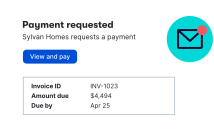
Send the invoice
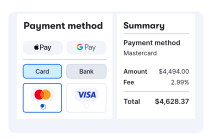
Client makes a payment
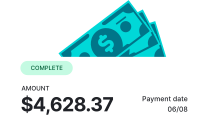
You get paid
See the full picture of your payments
With Client Payments, every step of the process is connected, tracked and visible – giving you total clarity across your jobs and cash flow.
Connected to the way you work
When you run your jobs in Buildertrend, Client Payments fits right in. Invoices pull directly from your budgets, purchase orders and schedules – keeping everything in sync and eliminating extra steps.
Faster pay, stronger cash flow
No more crew downtime waiting on payroll, no delays ordering materials – and no stress when it’s time to invest in new tools or hire more help. Client Payments keeps cash flowing so you can keep building – without interruption.
Easy for clients, hands-off for you
Clients pay how they want – ACH, card, Apple Pay, Google Pay – with one click. And automated reminders keep things moving. No awkward follow-ups required.
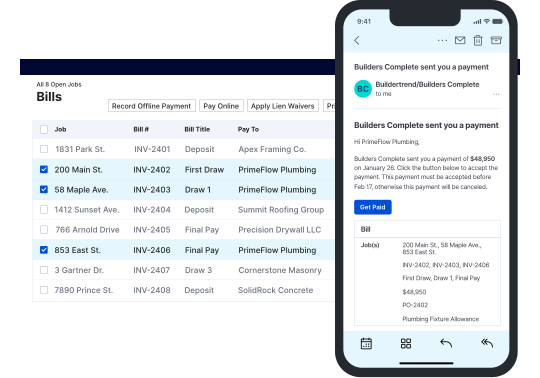
Bill Pay: Real-time visibility from approval to payout
Approve a bill
Send a payment
Sub or vendor gets paid
On-time payments build long-term trust
With Bill Pay and secure ACH payments built directly into Buildertrend, you can pay faster, reduce friction and create a more professional experience for your subs and vendors.
One integrated workflow
Every payment is managed in Buildertrend – no switching systems, no duplicate work. Payments pull directly from existing job data, so you can request work, approve the bill and pay your partners all in one place.
Fast, accurate payments
Built-in ACH, check and autopay options ensure timely, reliable payments – allowing subs and vendors to get paid up to seven days faster. Say goodbye to acceptance delays and manual errors with job information synced directly in Buildertrend.
Built for field-to-office alignment
Keep office and field teams on the same page with shared visibility into job progress and payment status, so bills are approved and paid only when work is complete. Free your team to focus on the job, not the paperwork.
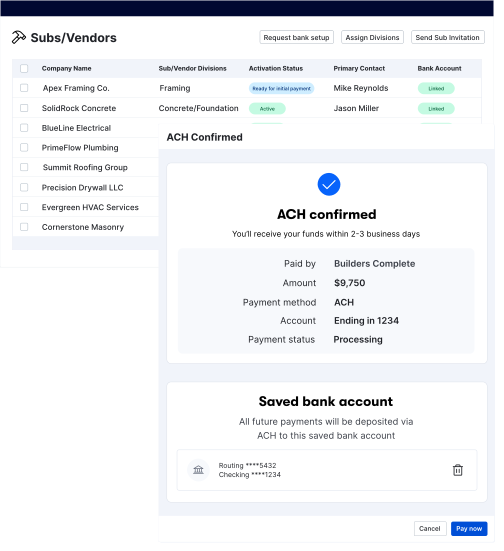
Payments that work like you do
Schedule a demo
Chat with our team to see Buildertrend in action – including how Client Payments simplifies invoicing and helps you get paid faster.

Have more questions?
Visit our Help Center to learn more about Client Payments.

Frequently asked questions
Yes. Buildertrend’s Client Payments are backed by bank-grade security to keep your clients’ information safe.
Yes, you can assign roles and permissions to ensure only authorized users approve or send payments in Buildertrend.
Yes. With just one click, you can choose to pass credit card processing fees directly to your clients – giving you more control over your bottom line.
You can support payments to subs, vendors, suppliers and any other project-related partners.
Yes. Payments sync with QuickBooks and Xero, helping you eliminate double entry and keep your books up to date.
Yes. It helps with having a healthy cash flow and keeps subs and clients happy. If you’re waiting weeks to get paid, you’ve upset subs with delayed payments or you’ve lost out on a job because the client wanted more convenient options – it’s time to upgrade.
Yes. Payments are synced with the job, eliminating duplicate data entry, manual calculations and misaligned approvals.
You can apply directly from your Buildertrend account by going to Payments Settings. We’ll need key business and ownership details – including tax ID, bank account info and identity verification for owners or controllers. Once your application is reviewed and approved, you’ll receive your monthly processing limit and can start accepting payments right away.
By keeping requests, approvals and payments in one system, Contractors avoid switching platforms, re-entering data and tracking multiple tools.
Pricing is per transaction. You pay only for what you use with no extra platform fees.
Subcontractors and vendors typically receive payments around seven business days faster than mailing or manual methods.
Processing time for ACH and credit cards is 3-5 business days.
Yes. All transactions are encrypted and follow industry-standard security protocols for financial data.
Yes. Every Buildertrend Payments account starts with a monthly processing limit based on your business and financial profile – similar to a credit card limit. You’ll also have a per-transaction cap of $120,000. As you continue processing payments and our payment processor gains familiarity with your account, your limit may increase over time. Many builders see their limits grow as their account matures.
Every payment, approval and job-related transaction is automatically synced and documented in Buildertrend for easy reference and audit purposes.
Construction payment software is a way to automate the payment process between general contractors and their subs or clients. It allows them to pay and get paid online through use of a credit card or e-check.
Clients can pay using ACH (bank transfer), debit and credit cards, Apple Pay or Google Pay. No portal sign-up is required – just a secure link they can click to pay instantly.
Schedule a demo
Set aside 30 minutes to chat with a friendly Buildertrend rep and discover firsthand how our platform can improve your business – and transform the way you work.

Based on 5,000 reviews on



Tell us a bit about yourself
By submitting this form, you are agreeing to our Terms and Conditions Agreement and Privacy Notice. This site is protected by Google reCAPTCHA.