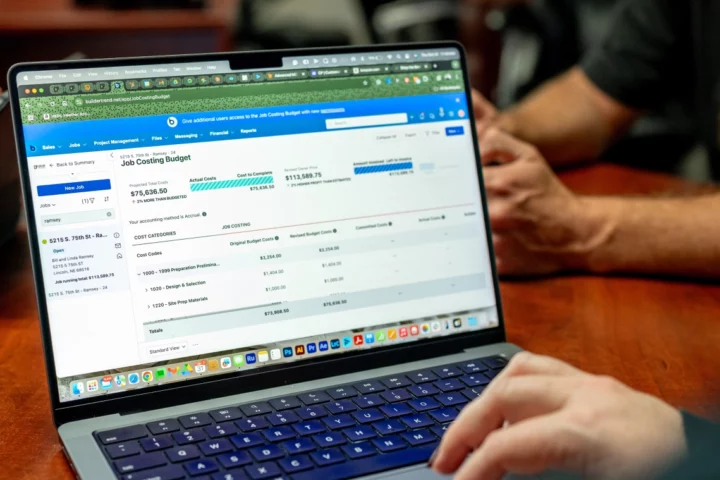
Effective job costing is arguably the most important part of keeping your business profitable. Through a detailed breakdown of each job, you’re able to track expenses in real time and address problems early.
Don’t get stuck overspending and losing money. Create a plan upfront and keep track of your costs throughout the entire project to maintain healthy cash flow.
In this blog, you’ll discover the tips and tricks of job costing and how to improve your processes. Learn why you should consider using job costing software for construction projects and which features to look for. Establishing a solid job costing process will keep your company growing and thriving.
Want to see construction job costing software in action? Watch our webisode on job costing to learn more.
- What makes job costing for construction so difficult?
- Tracking project expenses
- Dealing with change orders
- Managing cash flow
- How to improve construction job and project costing
- Features to look out for in construction job costing software
- Make better job costing decisions with Buildertrend
- Construction job costing FAQs
What makes job costing for construction so difficult?
There are many challenges when it comes to construction job costing. As you read through these challenges, you’ll discover how job costing software combats these struggles for real-life companies.
Accurately estimating job costs
Job costing is difficult because it’s typically done as early as possible with little information about a project. Seeing into the future to determine exactly how much a project would cost just isn’t possible. There’s no crystal ball in construction. With material prices fluctuating and the unknowns of how a job will progress, you’re faced with the challenge of estimating accurate job costs – and doing so by making your best educated guess.
Before Buildertrend, the Vaughan + Co. team used spreadsheets … sound familiar? This process never allowed team members to fully capture their margins. Now that they’re using Buildertrend’s job costing software, all financials are done with the help of the Budget feature. They can calculate cost more accurately and truly see where their profits are.
“Without Buildertrend it would be hard for us to keep track of our margins and maintain our profitability year over year,” Liz Vaughan, CEO of Vaughan + Co., said.
“It gives us real data to rely on and make decisions for a project,” Liz said. “So, we know where we can spend more money and where we should spend less money to stay within budget.”
Tracking project expenses
Too often project managers keep expenses and estimated numbers in their heads or manage them through unorganized spreadsheets – both ways are not ideal. By keeping track of numbers this way, you’re risking losing money for your business.
“There are real dollars that would have gotten lost if we weren’t using Buildertrend,” Amanda Worlow, co-owner of Casey Construction Company, said. “I can guarantee that previously when we didn’t have Buildertrend, over the course of a year, we would lose thousands of dollars by the time the year was done.”
“It all adds up with the receipts, small expenses that we paid for with a credit card or the things we didn’t add to the spreadsheet. Those items were forgotten about and wouldn’t be invoiced to the client. That’s real money!”
Before Buildertrend, Amanda was working out of an Excel document. That was not only costing the company time, but it was also losing money. “It was a huge frustration with basically all of our systems working out of Excel,” Amanda said. “Formulas would keep breaking or unlinking. It was just a very clunky system that created a lot of headaches and longer work hours in order to get an invoice out to a client. Out of that frustration is when we really started looking at what we could do and what we needed.”
Now Casey Construction Company uses Buildertrend to track project expenses using the Budget tool, QuickBooks integration and other financial features. Less time and money spent on financial frustrations means more time and effort spent on what matters most – their clients and team.
Dealing with change orders
Change happens, especially in construction. Builders know that the more complex a project, the more likely it’ll need adjustments. Change orders can be difficult to manage, and sometimes they’re just too complicated for project managers to get in writing and remember to collect payment on. That’s lost dollars. Sneller Custom Homes & Remodeling experienced this before turning to Buildertrend.
“I used to keep track of it all in my head,” owner Matt Sneller said.
Jenny and Matt Sneller made an effort to create a process that freed them from the never-ending emails, phone calls and text messages. They were able to develop a better system for tracking project changes through Buildertrend to save their business money.
“I couldn’t quantify an actual number, but using the Change Orders feature this way has saved us tens of thousands of dollars,” Matt said.
Managing cash flow
For a construction company, there can be hundreds of projects open at any given moment. Managing cash flow for all of these at once is a challenge. Some businesses can end up in a crunch due to unexpected expenses, clients can delay their payments too long, and the uncertainty of future cash flow can pose difficulties.
Companies just like Waunakee Remodeling were experiencing these challenges before implementing a system to help. This company has found the payment processing in Buildertrend, called Buildertrend Payments, to be the biggest game-changer for managing cash flow. It helps keep financials organized and ensures a steady stream of income. Buildertrend Payments is crucial for Waunakee Remodeling, which receives as many as 32 deposits per day.
By using online payments, team members know that their deposits are solid. It provides the security they need to help drive successful business decisions and functions for the future.
This is the power of a faster cash flow. Construction companies don’t have to wait for payment from one client to kick off a job for another. Implementing online payments allows cash to come in faster, ensuring there are always funds available to keep the business moving forward.
“Online processes absolutely speed payments up,” said Brian Ensminger, general manager of Waunakee Remodeling. “If you’re not participating in payment processing, you’re missing out on a huge opportunity.”
How to improve construction job and project costing
Upgrading your job costing process can save time and effort while creating more accurate estimated costs. An improved process will increase profitability by ensuring you stay on top of costs throughout the project and address issues early on.
Here are some steps you can take to improve construction project costing for your company.
Develop a detailed project plan
When job costing, you want to have a detailed project plan equipped with the scope of work. This plan can include designs, floorplan requests and an initial budget. You’ll need to deliver an accurate estimate, sign off on the budget, create the schedule, coordinate with subs and secure labor, materials and supplies.
When you’re equipped with a detailed project plan, you’re ready to take on the job. You have data to reference later, and your clients and subs are on the same page. You have costs listed, and through a solid estimate, contingencies will be built in to take on any unexpected job costs. This process will ultimately keep your profit margin high.
Leverage software and technology
Managing construction projects can be difficult, but implementing a system can significantly decrease the amount of stress and hours spent on each job. How do you create structure within the chaos of a construction project? The answer is simple – leveraging technology.
When you leverage project management software like Buildertrend, you have all the tools you need on one platform. Various pieces communicate with one another to avoid multiple entries and give you more insight into your job. Budgets are updated in real time with all project costs, so you’re able to get a better picture of where your job is at during any stage of the process.
Do regular cost reviews
As a project progresses, you’ll want to be aware of costs – where you’re over budget and what costs are coming up. This process helps reduce overspending and facilitates good financial health.
It’s easy to do cost reviews with a software’s Budget feature because numbers are updated when new data comes in like invoices, bills and payments. By staying ahead of costs, you’ll be able to plan and combat issues before it’s too late.
Use historical data to inform cost estimates
Estimates take more time than most builders would like. They’re essential to getting the most accurate projection for your project, to keep profit margins high and keep your client satisfied. By using historical data from past estimates, the process can be made significantly quicker.
In construction estimating software, the data is kept on the platform for reference. Numbers can be pulled into other projects, so you’re not inputting information manually every time.
Features to look out for in construction job costing software
There are many features to take advantage of in construction tech. These tools help effectively manage job costs and increase profits. Here are some of the most important features to look for in a construction job costing software.
Estimate feature
Creating an estimate is the first step to a successful job costing process. When your estimates are precise, you’re able to compare them to actual costs. By implementing estimating software, you can ease the process further by having the formulas automated and having a list of material costs in the platform for easy input. Within the software you can also implement more accurate takeoff.
Budget feature
With a budget feature, you can track your job costs and always know where you stand with updated estimates, new costs, bills and POs, time clock labor and total costs all on one page. Budgets ensure you’re never unaware of the financial stability of each project, and you’ll know where your money is going.
Accounting integration
Job costing software that can integrate with QuickBooks and Xero is essential to streamline your processes and stay on top of your bottom line. Integrating the systems gives you cloud-based access to your job costing from wherever and is available when you need it. The numbers are adjusted in real time. You’ll eliminate the need for double data entry and standardize your processes for managing job costs.
Invoice feature
Clients have high expectations, and those include knowing and understanding their financial responsibility. Job costing software can take the pain out of the invoicing process. Your clients will never have to wonder when payments are due, and they can get notifications for payment deadlines – and then pay from the same platform.
Purchase Orders and Bills features
Utilizing POs and Bills in software helps automate the process of two-way transactions. Purchase orders create an intentional barrier by forming a commitment between you and your vendor or subcontractor. POs will allow you to catch overages in real time without checking your budget, and they will not let you make a payment higher than the PO amount. Bills can be used for quick non-contracted transactions like dumpster fees and material purchases. Both features help reduce overspending and improve profitability.
Change Order feature
Change orders can result in added costs, delays and disruptions if they’re not managed effectively. That’s why having a system in place for these changes is critical. A change order feature allows for clear documentation and is essential to avoid disputes. When change orders are entered into a system, you’re able to quickly modify the budget and keep the project moving forward.
Payment processing feature
Online payments will take your job costing process to the next level. You can get paid faster, and there are no more awkward texts or pushy emails begging a client to pay you. It also improves customer experience as clients can pay through an emailed link and use the payment method of their choice. A payment processing system like Buildertrend also lets you track what you’ve billed versus what the invoice reflects. It makes the job costing process more efficient because your cash is consistently moving on schedule.
Make better job costing decisions with Buildertrend
Buildertrend provides improved estimating and job costing with many features in the construction project management software. Your job costing process can be made less stressful and can put time back into your workday.
Within the software, you’ll have the ability to quickly estimate and send out bids and purchase orders. You can effectively manage change orders and send invoices to clients. All data is funneled into your budget for an easy, at-a-glance view to manage your project.
The ability to integrate with your construction accounting software like QuickBooks or Xero eliminates the need for double entry and keeps job costing data even more accurate. The payment processing within Buildertrend’s software tops it all off. You can eliminate late payments and keep cash flow steady for your business.
In this webisode, the fifth in our financial series, “The Bottom Line,” we give you expert insights into our software’s financial tools, so you can be confident in knowing you’re making the best decisions for you and your business.
Watch the full episode to learn more about how you can use Buildertrend’s powerful job costing features and capabilities to control your business financials and increase profitability.
This video covers:
• The job costing features and capabilities within Buildertrend
• How Buildertrend’s Purchase Order feature can improve profitability
Now that you’ve heard the benefits of improving your job costing process, consider investing in a job costing software to help. Ready to start running your job costing process through Buildertrend? Schedule a demo with us.
Construction job costing FAQs
Check out these answers to common questions about construction job costing.
To calculate job cost for each construction project, you’ll use this formula:
Total job cost = materials + labor + overhead
Two common costing methods are job costing and process costing. Job costing is detailed and best for unique projects. It requires intense record-keeping and accounting for every single cost. Process costing is used as a standard pricing approach for mass-producing large volumes of similar goods. It’s used most in manufacturing industries.
Labor, materials and overhead costs all go into the total job cost. Expenses to add to the calculation include labor hours for crew members and subcontractors and material costs like wood, safety equipment and concrete. Lastly, you’ll add in overhead costs, which can include permits, temporary office space or sanitation facilities.
Job costing is a way for your construction company to accurately track all costs associated with each job. The total job cost includes labor, materials and overhead. By creating a detailed cost breakdown for the entire project, you can track expenses in real time and assess profitability. The more detailed the breakdown, the more likely you’re able to combat issues early that could affect profit margins.
Job costing throughout each project is crucial to keeping your company’s profit margins high and the job on track. Through job costing you’re able to compare estimated costs with actual costs so you can target overspending and resolve issues early. It’s important to provide a picture of exactly where your money is going. You can also assess how well you’re managing resources. Overall, job costing ensures your business maintains a healthy cash flow and profit margin.
Based on what you just read, we think you'd enjoy...
These suggestions are made by our team to help you find builders and stories that you relate to!
Back to all blogs