




Bluebeam for construction collaboration and control
Bring every submittal or RFI reviewer into one connected workflow. Buildertrend manages the record while Bluebeam powers real-time PDF markup. No manual email lists. No file re-uploads.
Not yet a customer? Get a demo
Unified tool stack
One-click Bluebeam session launched directly from the submittal or RFI.
Collaboration
Subs and outside reviewers don’t need a paid Bluebeam license. They get free Bluebeam ID access for 14 days with full markup, measure and comment tools.
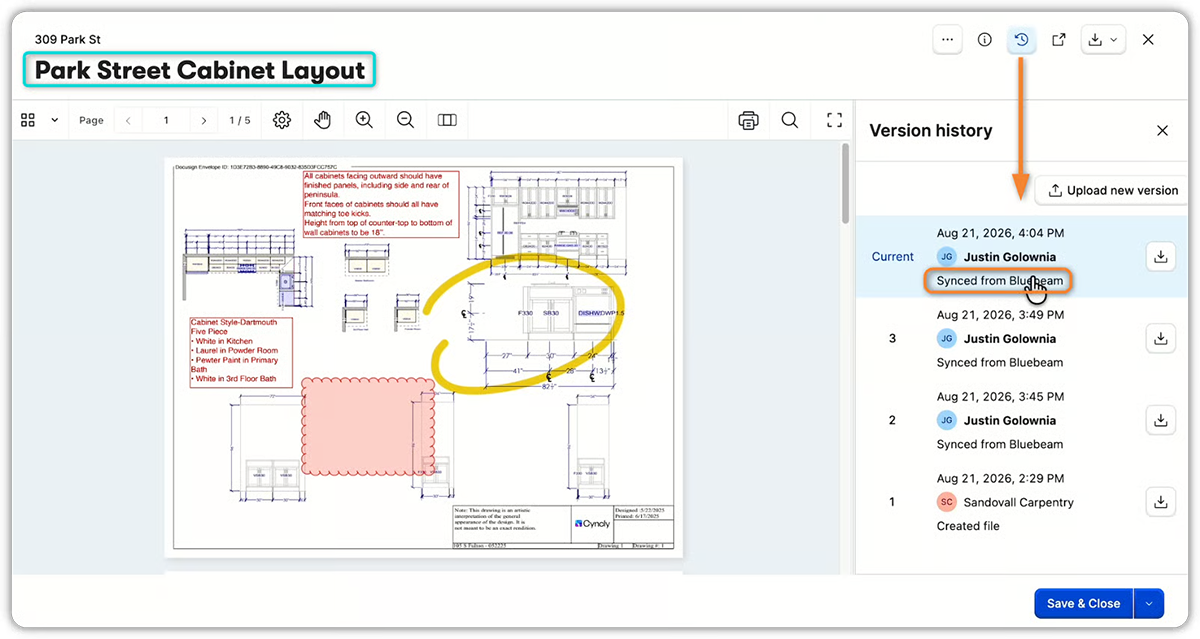
Version history
Marked-up files come back as a new version of the original document and Buildertrend stays the system of record.
Requirements
Buildertrend subscription
Required
Account permissions
On RFIs, starting, joining or managing a session requires RFI Update permission, in addition to an active org-level Bluebeam connection.
Type of plan required
Bluebeam subscription with Studio access.
How does the Bluebeam integration work with Buildertrend?
One-click sessions
Launch a Bluebeam markup session directly from the submittal. No shuffling files between systems.
Free access for external users
Every sub, approver and reviewer gets a free Bluebeam ID with full markup, measure and comment tools. No added subscription cost.
Self-building invite list
Session invites pull automatically from the submittal’s reviewers, approvers and subs. No manual email copying.
Automatic version sync
Marked-up files sync back as a new version on the same submittal. Version history stays intact and Buildertrend remains the system of record.
Mobile access
Real-time Bluebeam sessions work on mobile, so reviews can happen onsite instead of back at the office.
RFI support
The same Start a Bluebeam Session card appears on the RFI question view for one consistent markup workflow across submittals and RFIs.
Why use Bluebeam and Buildertrend?
Buildertrend connects to Bluebeam, so reviewers, approvers and subs mark up submittal and RFI documents together in real time, in one session instead of scattered email threads. When the markup is done, it comes back into Buildertrend automatically as the next version of the same document, on the same record, with full history intact. Bluebeam is where the markup happens. Buildertrend is where it lives.
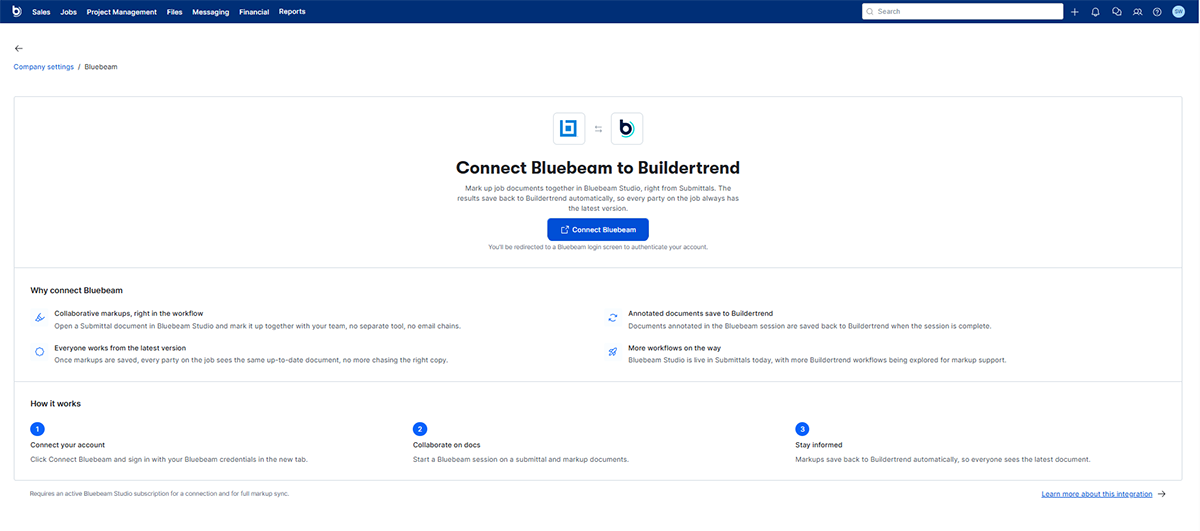
Installation
- Log in to your Buildertrend account.
- Click on your account icon in the top right corner.
- Select Company Settings.
- Scroll down and click Bluebeam.
- Click Connect Bluebeam and sign in with your Bluebeam credentials in the new tab.
- You’re all set!
Take control of your construction documents with confidence.
Ready to streamline collaboration? If you’re already a Buildertrend customer, log in to your account to set up the Bluebeam integration today.
Not yet a Buildertrend customer?
FAQs about the Bluebeam integration with Buildertrend
Yes. Builders need an active Bluebeam Studio subscription – Core or Complete – paid directly to Bluebeam. Subs and outside reviewers don’t need one. They get free access through Bluebeam ID.
Through an OAuth connection with ongoing API access. Buildertrend runs a connection health check on every session attempt and flags it if the integration goes stale.
Starting, joining or managing a session requires RFI Update permission and an active org-level Bluebeam connection. In v1, sessions cover only the question’s attachments, not the response’s. If the RFI is deleted, its Bluebeam session closes automatically. Owner document uploads on RFIs still follow existing folder permissions; no new upload path was added.
PDF documents only. Plan sheet markup isn’t supported yet.
No. The integration is optional and strictly additive. Customers who don’t connect see no change to their existing workflow.