



Variables & Inputs
Variables are a property group at the part level. Items that are listed under the variables group are all properties. This can be an organizational tool, as the Variables can be used for properties that are part-specific and also available for the formula writer.
To view a current variable, hover over the Estimating tab and click Templates.

Next, click on the Edit button next to the part.
From here, click on the Properties tab.
By clicking on the arrow to the left of the variables section, you can view each specific property name and its contents. By clicking on the (+) you can add a new variables property group to this part.
From here you can update the Property Data and Inputs.
Those properties with Allow Input checked, will be available to change the property value with the (+) on the right much faster.
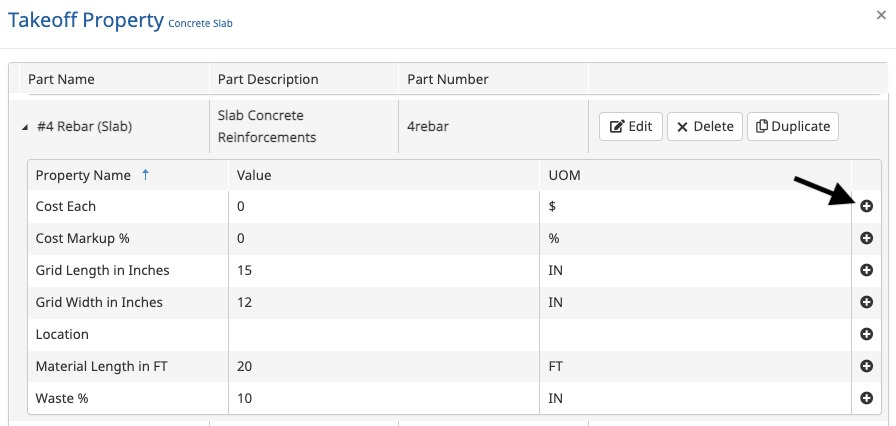
You have now successfully updated your Variables and Inputs!

Interested in Learning More? 📚
Visit the Buildertrend Learning Academy to explore additional learning opportunities — from live group trainings and certifications to on-demand courses and more.
For questions or additional support, contact our Customer Support team via Live Chat, email support@buildertrend.com, or call 1-888-415-7149 — we’re always happy to help.
Still have questions or need our help finding a resource?
Contact our Customer Success team.
Mon - Fri
8:00am - 5:00pm
USA (CST-6)