




Sage Intacct for construction accounting
Bring operations and accounting together to drive smarter decisions, sharpen financial visibility and strengthen project outcomes.
Not yet a customer? Get a demo
Accounting
Sync your accounting data across all devices to simplify financial processes and keep your team aligned.
Payments
Send professional invoices and accept payments from anywhere – in the office or out in the field.
Job costing
Track time and expenses for each project and run comprehensive job costing reports to stay on top of profitability.
Tax management
Simplify tax season by sending subcontractors direct requests to submit their information in one secure location.
Accuracy
Keep your financial data protected, precise and free from the costly errors that come with manual entry.
Financial control
Review and edit files, budgets and numbers on your terms – wherever the job takes you.
Requirements
Buildertrend subscription
Required
Account permissions
No additional permissions required
Type of plan required
Sage Intacct subscription
How does the Sage Intacct integration work with Buildertrend?
Streamlined accounting
Say goodbye to paperwork and manual data entry. Sage Intacct syncs your accounting data across all devices, so you can process payroll, balance cash flow and analyze profits and losses from anywhere.
Automated payments
Accept payments directly from your phone, send invoices with attached plans, contracts and photos – and get instant notifications the moment an invoice is paid.
Job costing
Run detailed job costing reports with time and expense tracking for each project, giving you a clear picture of which jobs are profitable and which ones need attention.
Data accuracy and security
Unlike error-prone spreadsheets, Sage Intacct is built to handle sensitive financial data with confidence. No more worrying about accidental deletions or costly mistakes.
Remote financial control
You’re rarely behind a desk, and your accounting software should reflect that. Manage, edit and review your financials from the field, the job site or wherever the day takes you.
Why use Sage Intacct and Buildertrend?
Sage Intacct goes beyond bookkeeping by integrating seamlessly with Buildertrend’s construction management software. Its two-way sync transfers information between both platforms in just a few clicks – keeping your data consistent without the manual work. Push job-specific expenses from Buildertrend directly to Sage Intacct for faster, more accurate job costing.

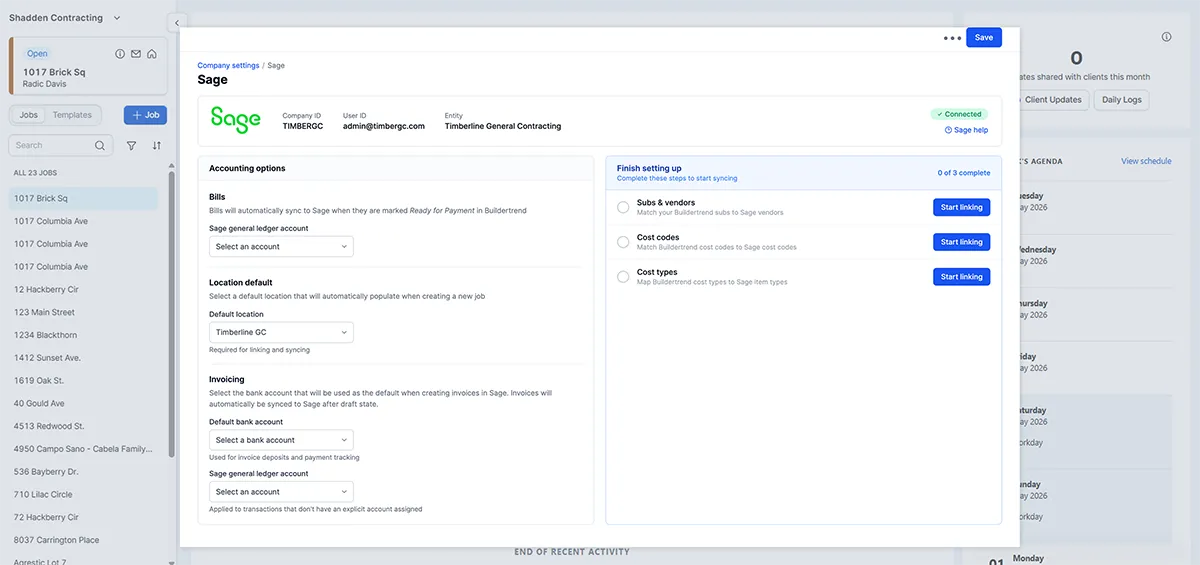
Installation
- Log in to your Buildertrend account.
- Click on your account icon in the top right corner.
- Select Company Settings.
- Scroll down and click on the Accounting tab.
- Click Get Started with Sage.
- Log into Sage and use Our connection guide.
- You’re all set!
Take control of your construction finances with confidence
Ready to streamline your accounting? If you’re already a Buildertrend customer, log in to your account to set up the Sage Intacct integration today.
Not yet a Buildertrend customer?
FAQs about the Sage Intacct integration with Buildertrend
Yes. Both Sage Intacct and Buildertrend are built with data security as a priority. Sage Intacct is specifically designed to handle sensitive financial information, so you can trust your data is protected whenever it’s synced between the two platforms.
The two-way sync allows information to flow seamlessly between both platforms in just a few clicks. Any updates made in Sage Intacct – such as job-specific expenses or payments – are automatically reflected in Buildertrend, and vice versa. This eliminates duplicate data entry and keeps your financials and project details consistently up to date across both systems.
To use the integration, you’ll need an active Buildertrend subscription and a Sage Intacct subscription. No additional account permissions are required beyond that, making it straightforward to get set up and start syncing your data right away.