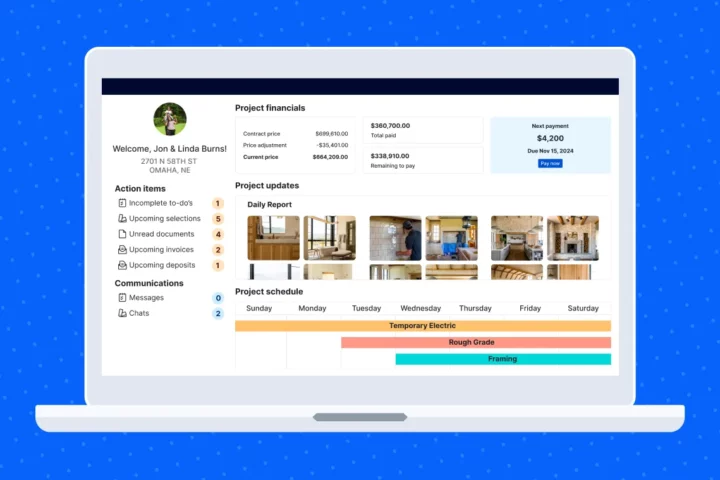
How smart builders are using their website to streamline client communication

Clear communication isn’t a bonus – it’s the backbone of every successful project. But let’s be honest: Builders and clients don’t speak the same language. What’s second nature to you might leave your clients confused, stressed or too embarrassed to ask.
Smart builders are solving that by turning their websites into communication hubs. They’re building trust early, answering questions before they’re asked and setting clear expectations from day one.
The result? Fewer phone calls, faster decisions and smoother builds.
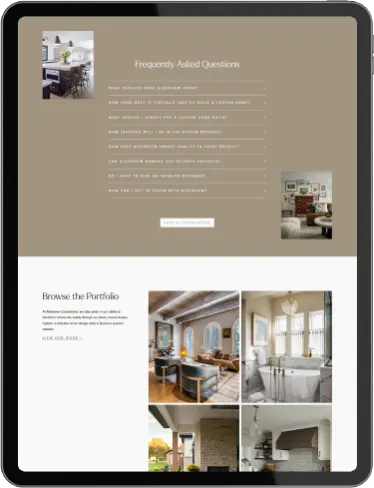
Build a smarter FAQ page
If you’re answering the same questions every week, you need a solid FAQ. Most builders spend 5–10 hours a week clarifying basics. Time that could be better spent on actual building.
A good FAQ doesn’t just answer common questions – it anticipates them. Organize it by phase. Use plain language. Cover delays, timelines and why things happen the way they do.
The most effective construction FAQs:
- Group questions by project phase (pre-construction, foundation, framing, etc.)
- Translate industry terminology into plain language
- Address timeline concerns and common causes of delays
- Explain the “why” behind construction practices
Pro tip: Skim your recent client emails. What keeps coming up? That’s your FAQ content.
Set expectations with a process page
Clients worry when they don’t know what’s next. A clear process page calms those nerves.
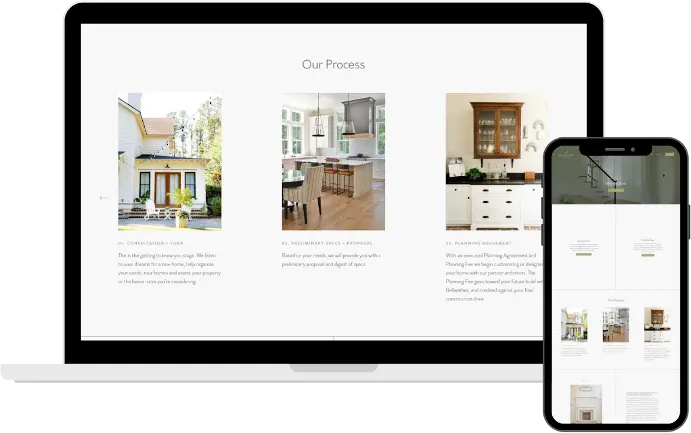
Use simple visuals or an accordion layout to break things down by phase – timelines, milestones and what decisions they’ll need to make. Learning how to effectively manage client expectations through your website is crucial for preventing misunderstandings and building trust from day one.
For visual learners, basic timeline graphics with icons representing each major milestone help clients grasp the big picture at a glance. These don’t need to be technically complex – even a simple horizontal timeline with phase markers can dramatically improve client understanding.
Remember, the goal isn’t to document every nail and screw – that would overwhelm potential clients. Your process page should provide enough detail to demonstrate expertise, while still leaving room for personalized discussions. Include the major phases and milestones that affect the client directly, with the understanding that you’ll walk them through the fine details in person.
Create a resource library that works for you
Education builds trust. A resource hub gives your clients what they need – and saves your team from repeating the same info.
Consider offering downloadable process brochures, material comparison guides, maintenance schedules and a glossary that translates industry jargon into plain English.
Short on time? Agencies like IDCO Studio offer pre-made client process bundles you can brand and use right away.
Bonus: Blog posts can double as SEO drivers and client resources. Topics like “5 Things to Consider Before Choosing Flooring” can attract search traffic while helping clients make more informed decisions.
The payoff? Clients who have access to well-organized educational resources tend to make decisions more confidently and quickly, reducing the back-and-forth that delays projects.
Automate the basics
Yes, clients will still want to talk to you. But automating updates can make those conversations faster and more useful.
Start with smarter forms. Rather than generic “Contact Us” forms, implement forms that respectfully ask for budget range, project scope, timeline expectations and location. This approach helps you identify your ideal clients and saves time for both parties by preventing consultations that aren’t a good fit.
You can also automate email updates by project phase. For example: “Framing’s done – here’s what’s next.” It’s not about removing the human touch. It’s about making space for the conversations that matter.
The goal isn’t to replace personal communication but to enhance it. Automated systems handle routine updates, freeing you to focus on meaningful client conversations that truly require your expertise.
Sync with your project management software
Your website sets the tone. Your specialized project management software – like Buildertrend – keeps it going. Many builders find that these tools serve as powerful extensions of their website’s selling capabilities throughout the project lifecycle.
If you’re using tools like Buildertrend, make sure what clients see on your site matches what they’ll see during their project – same phases, same process. You can even add a “Client Experience” page that previews the system they’ll use.
The most effective builders create consistency between their website information and their project management portals, creating a familiar experience that builds confidence.
One small change, big impact
Your website isn’t just a marketing tool – it’s potentially your most efficient client communication asset.
Strategic FAQs, simple process pages, helpful resources, prequalifying forms and synced software – each one is a step toward better client communication and fewer headaches for you.
The benefits are substantial: Fewer repetitive questions, more confident clients, faster decision-making, higher-quality leads and significantly reduced miscommunications.
Not sure where to start? Audit your current site from a client’s perspective. What questions go unanswered? What industry terms need translation? Then implement just one improvement.
That single change might save you hours of explanation time while building the trust that leads to smoother projects and stronger referrals. Small tweaks can mean big time savings – and smoother builds.

Based on what you just read, we think you'd enjoy...
These suggestions are made by our team to help you find builders and stories that you relate to!
Back to all blogs